Getting Started
Welcome to the faktoora API — your gateway to seamless, compliant and automated e-invoicing.
This guide is designed for developers who want to integrate faktoora into their systems as quickly and effectively as possible. It provides an introduction to the key concepts, workflows, and how to get started with real examples.
What Is Electronic Invoicing?
In Germany and across the EU, electronic invoicing is governed by structured data standards that enable automated processing. The two main supported formats are:
- XRechnung: a German implementation of the EN 16931 standard. It is mandatory for B2G (Business to Government) transactions.
- ZUGFeRD: combines a human-readable PDF with embedded XML. Ideal for B2B and B2C invoices. ZUGFeRD 2.x is also EN 16931-compliant.
Both formats are supported by faktoora, and you can choose the right one per recipient or use case.
What Does the faktoora API Do?
With faktoora, you can:
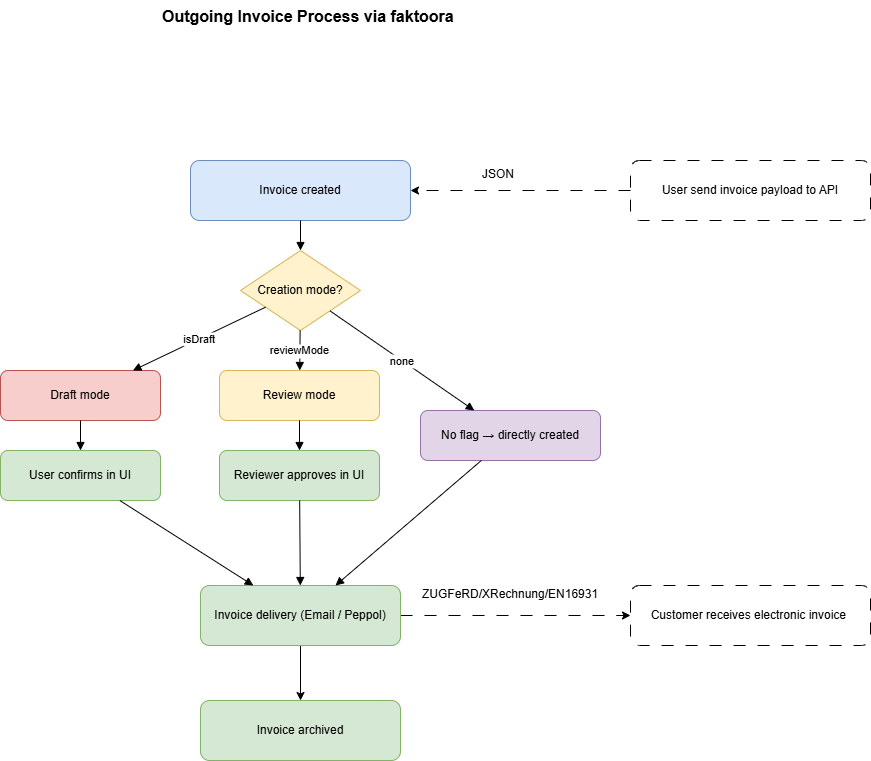
- Create and send invoices via API
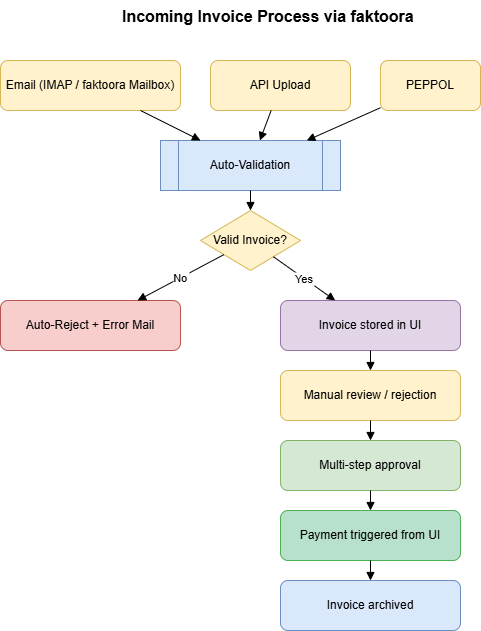
- Receive and process incoming invoices from multiple channels
- Automate validation, status tracking, and delivery
- Integrate approval workflows and bank payment via our UI
- Use both API and UI together for flexible, hybrid workflows
We support:
- Outgoing invoices via email or PEPPOL
- Incoming invoices via email (IMAP), PEPPOL, or direct upload
- Automatic validation and rejection
- Multi-step approvals (4-eyes principle)
- Final invoice archiving and audit trail
API & UI: Hybrid Workflow
While most automation happens through the API, our platform UI lets users:
- Review and confirm draft or review-mode invoices
- Manually send or reject documents
- Set approval permissions
- Trigger payment once an invoice is accepted
Example:
→ Create a draft via API, confirm it in the UI, send manually
→ Receive an invoice via PEPPOL, review and pay it in the UI
Outgoing Invoice Process
Incoming Invoice Process
Authentication
All API endpoints require authentication via API key:
X-API-KEY: your-api-token
There is no OAuth, no login – just simple key-based headers. You’ll receive your API key from faktoora during onboarding or via the dashboard.
Failure responses
Any request without a valid API key returns the same response. The body shape is identical whether the header is missing, empty, malformed, or simply doesn’t match a real key — there is no information leak that distinguishes the cases.
{
  "code": "UNAUTHORIZED",
  "statusCode": 401,
  "message": "Authentication failed or missing"
}
If you see this, check the X-API-KEY header for typos and confirm the key has not been revoked in your dashboard.
Glossary
Not sure what faktooraId, status, format or invoiceTypeCode mean?
👉 Check out our Glossary
Tooling
- Postman or Hoppscotch for testing requests
- PEPPOL Tools for validation and routing
- faktoora sandbox (on request)